
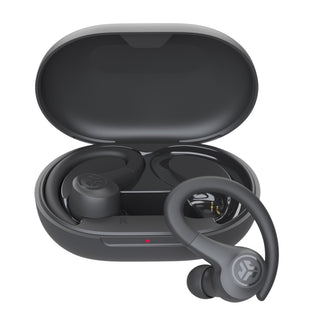
JLab Go Air Pop Bluetooth Earbuds, True Wireless with Charging Case, Black

$31.87
Free Shipping
- Selected color
- Black
- Format
- True wireless in-ear earbuds
- Reliable deliveryFree expedited shipping · Estimated delivery: 2–3 business days
- Easy to make rightEligible items have 30-day returns
- Freshness promisedUnopened, in-date and ready to use
A closer look
About this product
Black GO Air POP earbuds with a charging case
These JLab GO Air POP true wireless earbuds come in Black with their charging case. The in-ear design uses silicone ear tips, with different sizes available to help find a suitable seal. Either the left or right earbud can be used independently for music or phone calls. Choose the original GO Air POP identification when comparing similar JLab products, since controls and charging details can differ between models.
Pair through the device’s Bluetooth settings
For initial setup, remove the shipping tab and close the case, then take the earbuds out. One earbud blinks blue and white when ready to pair. Select JLab GO Air Pop in your device’s Bluetooth settings. Only one Bluetooth device can be connected at a time. To move to another device, turn Bluetooth off on the previously connected device, enable it on the new one and select the earbuds there.
Use touch controls and keep the charging case dry
Touch controls provide playback, call and volume functions. Triple-tap either earbud to cycle among JLab Signature, Balanced and Bass Boost sound modes. Put the earbuds in the case to switch them off and charge them. Fully dry the earbuds before returning them: the earbuds are sweat and water resistant, while the case is not. Avoid extreme heat, cold and humidity, and keep the earbuds protected from drops or crushing when carried or stored.
The details that matter
JLab Go Air Pop Bluetooth Earbuds, True Wireless with Charging Case, Black specifications
Product identity
| Brand | JLab |
|---|---|
| UPC / GTIN | 812887017183 |
| Model family | GO Air POP |
Format & quantity
| Selected color | Black |
|---|---|
| Format | True wireless in-ear earbuds |
Features & care
| Included | Earbuds, charging case and silicone ear tips |
|---|---|
| Connection | Bluetooth; one connected device at a time |
| Sound modes | JLab Signature, Balanced and Bass Boost |
Orders are fulfilled by trusted retail distribution partners. Packaging may identify a fulfillment partner; Shipabob remains your point of contact.
Shipping, fulfillment & returns
Free expedited U.S. shipping with estimated delivery in 2–3 business days, including handling. See our shipping policy for cutoff times and handling and transit days.
We’ll email tracking as soon as your order is on the way. Orders are fulfilled by trusted retail distribution partners, so packaging may identify a fulfillment partner. Eligible items may be returned within 30 days; see our policies for complete terms.
Need help?
Shipabob is your point of contact for every order. Email [email protected] or send us a message.
Questions about this product
Can I use just one earbud for a call?
Yes. The left or right earbud can be used independently for music and phone calls. Take the chosen earbud out of the case to connect it. Choose a comfortable fit with the supplied ear tips, and keep the other earbud in its case when it is not being used.
Can they stay connected to two devices simultaneously?
The GO Air POP instructions specify one connected Bluetooth device at a time. Turn off Bluetooth on the previously connected device before connecting a different one. Select JLab GO Air Pop in the new device’s Bluetooth settings rather than assuming both sources will remain connected together.
How are the three sound modes selected?
Triple-tap either earbud to cycle through JLab Signature, Balanced and Bass Boost. Signature emphasizes bass and vocals, Balanced has no additional sound enhancement, and Bass Boost emphasizes bass. Try the modes with familiar audio after fitting the ear tips so the fit and selected sound mode can be considered separately.
What USB power source does the case use?
The original GO Air POP instructions direct connecting the case to a computer or a USB output supplying five volts at one amp or less. Follow the supplied charging instructions for this model. Keep the case and its charging connection dry, and let wet earbuds dry completely before inserting them.
What should I check if the earbuds will not connect?
Check that the intended source device has Bluetooth enabled and that a previous source is disconnected. If the earbuds need a manual reset, use the complete GO Air POP reset sequence in the instructions. That sequence includes forgetting the saved Bluetooth connection and resetting both earbuds in the charging case.
What fit and care precautions apply?
Try the available ear-tip sizes and gently adjust the position for a comfortable seal. Avoid extreme temperatures, humidity, dropping and crushing. Lower the volume or stop use temporarily if discomfort occurs. The charging case is not water resistant, so fully dry both earbuds before putting them back for storage or charging.


