

JLab Go Air Sport Bluetooth Earbuds, True Wireless with Charging Case
$35.87
Free Shipping
- Selected color
- Graphite/dark gray
- Volume controls
- Single tap left for lower volume,right for higher volume
- Reliable deliveryFree expedited shipping · Estimated delivery: 2–3 business days
- Easy to make rightEligible items have 30-day returns
- Freshness promisedUnopened, in-date and ready to use
A closer look
About this product
Earhook earbuds with a rechargeable case
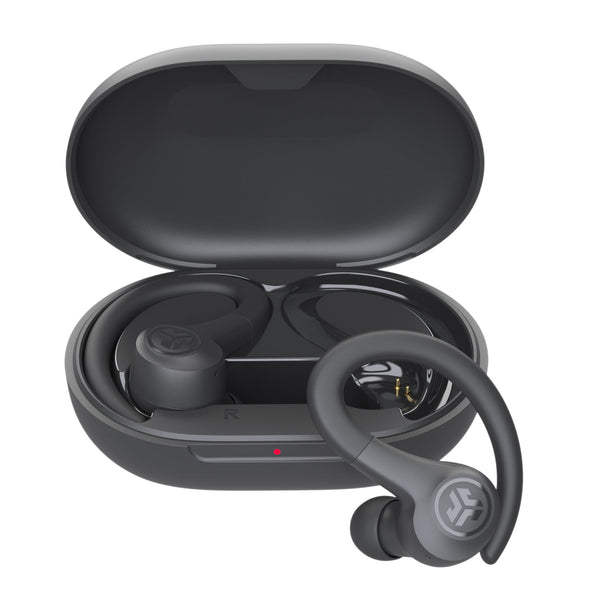
These JLab GO Air Sport earbuds use an earhook design and come with a charging case and three sets of gel tips. The selected Graphite finish is dark gray. Place the hook behind each ear, then rotate and adjust the earbud. Try the supplied tips to find the fit and seal that work for your ears.
This USB-A configuration is rated for 8+ hours of playback in each earbud and 32+ hours total with additional charging from the case. The total includes recharging between listening sessions. Return the earbuds to the case when they need power;placing them inside switches them off and starts charging.
Pair and control from the earbuds
For first-time setup, remove the stickers from the earbuds, place them back in the case and close its lid. Take them out again to begin pairing. One earbud flashes blue and white. Choose JLab GO Air Sport in your device’s Bluetooth settings;the connected voice prompt and blinking white lights confirm the connection.
A single tap on the left lowers volume;the same tap on the right raises it. Double tap the right earbud to play or pause. Holding the left or right control for more than a second moves backward or forward through tracks. Three taps on either earbud cycle the JLab Signature,Balanced and Bass Boost EQ modes.
Use either earbud and charge through USB-A
You can use either the left or right earbud independently for music and phone calls. Choose one and remove it from the case to connect. The manual specifies one connected Bluetooth device at a time. When changing devices, turn off Bluetooth on the previous device before connecting the next one.
The case has its USB-A charging cable integrated into it. Connect it to a computer or a USB supply with 5V, 1A or less output, as directed in the manual. The case’s blue light blinks during charging and becomes solid blue when fully charged. Earbuds power on and connect when removed from the case.
Keep moisture away from the charging case
The IP55 rating applies to the earbuds only. The charging case is not water resistant. Fully dry the earbuds before returning them to the case to avoid moisture damage. Follow that drying step after exercise or other exposure to sweat;the earbuds’ resistance does not extend to a wet charging case.
Avoid extreme heat, cold and humidity, and protect the earbuds from dropping or crushing. Wax buildup in the tips can affect sound;the manual advises carefully removing it with a cotton swab. If listening causes discomfort or pain, lower the volume or pause use. For regular discomfort, stop using the earbuds and consult your physician.
The details that matter
JLab Go Air Sport Bluetooth Earbuds, True Wireless with Charging Case specifications
Product identity
| Brand | JLab |
|---|---|
| Manufacturer model | EBGAIRSPRTRBLK124 |
| UPC / GTIN | 812887017404 |
Format & quantity
| Selected color | Graphite/dark gray |
|---|---|
| Volume controls | Single tap left for lower volume,right for higher volume |
Features & care
| Design | True wireless earhook earbuds with charging case |
|---|---|
| Included tips | Three sets of gel tips |
| Playback rating | 8+hours per earbud;32+hours total with charging case |
| Charging connection | Integrated USB-A cable |
| First-time preparation | Remove contact stickers,replace earbuds in case and close lid before pairing |
| Pairing name | Select JLab GO Air Sport in Bluetooth settings |
| Pairing indication | One earbud flashes blue/white;connected voice prompt and blinking white lights |
| Playback controls | Double tap right to play/pause;hold left/right1+second for previous/next track |
| EQ control | Triple tap either earbud to cycle three EQ settings |
| EQ modes | JLab Signature,Balanced,Bass Boost |
| Single-earbud use | Either left or right earbud works independently for music and calls |
| Device connection limit | One Bluetooth device at a time |
| Case charging supply | Computer or USB5V1A(or less)output device |
| Case indicators | Blue blinking while charging;solid blue when fully charged |
| Fit | Try tips;place hook behind ear,rotate and adjust |
| Moisture precaution | Fully dry earbuds before charging;case is not water resistant |
| Earbud IP rating | IP55,earbuds only |
| Storage and handling | Avoid extreme heat,cold,humidity,dropping or crushing |
| Tip care | Carefully remove wax buildup with cotton swab |
| Comfort precaution | Lower volume or pause use for discomfort;stop and consult physician for regular discomfort |
| Automatic case behavior | Earbuds power off and charge in case;power on/connect when removed |
Orders are fulfilled by trusted retail distribution partners. Packaging may identify a fulfillment partner; Shipabob remains your point of contact.
Shipping, fulfillment & returns
Free expedited U.S. shipping with estimated delivery in 2–3 business days, including handling. See our shipping policy for cutoff times and handling and transit days.
We’ll email tracking as soon as your order is on the way. Orders are fulfilled by trusted retail distribution partners, so packaging may identify a fulfillment partner. Eligible items may be returned within 30 days; see our policies for complete terms.
Need help?
Shipabob is your point of contact for every order. Email [email protected] or send us a message.
Questions about this product
How do I change the sound mode?
Triple tap either earbud to cycle JLab Signature,Balanced and Bass Boost. These controls let you select among the three modes directly on the earbuds.
Can I connect two Bluetooth devices at once?
The manual specifies one device at a time. Turn off Bluetooth on the previously connected device, then select JLab GO Air Sport on the next device.
Is the charging case covered by the IP55 rating?
No. That rating applies to the earbuds only. The case is not water resistant, and the earbuds must be fully dry before charging inside it.


